Bookmarks Bundle: Back to School Crafts and Laser Cut Files
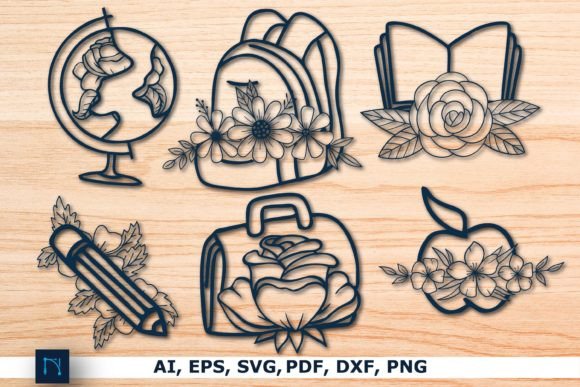
As the back-to-school season approaches, creative educators, crafters, and DIY enthusiasts are looking for unique ways to make learning more engaging and personalized. One of the most popular tools in this creative space is the Bookmarks Bundle, which includes a set of Back to School Crafts and laser-cut design files. These digital templates are perfect for those who enjoy crafting with precision and creativity, whether they're using a Cricut, Glowforge, or other laser cutting machines.
What Are Laser Cut Files?
Laser cut files are digital designs that can be used with laser cutting machines to create intricate patterns, shapes, and decorative elements. These files are typically in formats such as .SVG, .AI, .DXF, and .PDF, making them compatible with a wide range of cutting tools. When you purchase a laser cut file, you’re essentially getting a blueprint that can be transformed into a physical object through precise laser technology.
Why Use Laser Cut Files for Bookmarks?
Bookmarks are not just functional items; they can also serve as beautiful pieces of art. Using laser cut files allows you to create custom bookmarks with detailed engravings, patterns, and text. Whether you're making them for your classroom, as gifts, or for personal use, these files offer a high level of customization and precision.
Exploring the Bookmarks Bundle
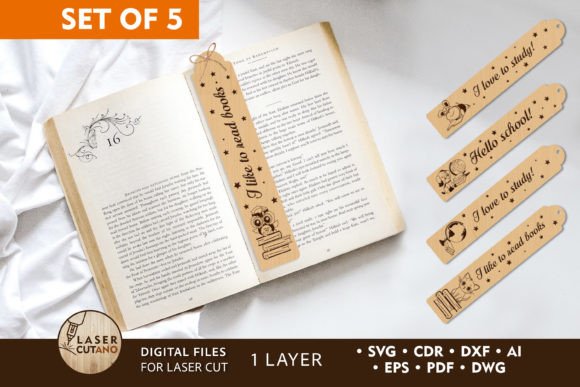
The Bookmarks Bundle is a comprehensive collection of 5 multilayer layout files designed specifically for laser cutting. Each bookmark in the set is crafted with attention to detail, ensuring that the final product is both visually appealing and structurally sound. The bundle includes a variety of designs that cater to different interests and styles, from modern minimalism to playful educational themes.
Design Features and Customization Options
- Engraving Options: Each bookmark includes engraved elements such as pencil holders, geometric shapes, and text, allowing for a personalized touch.
- Customizable Layers: The multilayer design allows users to modify individual components, such as adding decorative shapes, patterns, or text.
- Material Flexibility: You can choose from a range of materials like plywood, MDF, acrylic, plexiglass, metal, cardboard, and paper to suit your project's needs.
- Size Adjustments: While the default size is 1.5 x 8.5 inches, you can scale the design up or down, keeping in mind that thin elements may require adjustments when reducing the size.
How to Use the Bookmarks Bundle
Using the Bookmarks Bundle is straightforward, even for beginners. Here’s a step-by-step guide to help you get started:
- Download the Files: After payment, you will receive a .zip file containing all the necessary design files in various formats.
- Unzip the File: Extract the contents of the zip folder to access the individual design files.
- Choose Your Material: Select the material that best suits your project, considering factors like thickness and durability.
- Prepare the Design: Open the design file in your preferred software (such as Adobe Illustrator or Inkscape) and customize it according to your preferences.
- Upload to Your Cutting Machine: Transfer the file to your laser cutter, CNC router, or other cutting machine, following the manufacturer’s instructions.
- Make Your Bookmark: Let the machine do the work! Once the cutting is complete, you’ll have a beautifully crafted bookmark ready to use.
Recommended Materials and Thickness
For wood-based materials, a thickness of 3–6 mm is recommended, with options ranging from 1/4 inch to 1/2 inch. Acrylic and plexiglass can be used with similar thicknesses, while thinner materials like cardboard or paper may require additional reinforcement for durability.
Practical Applications and Educational Benefits
These bookmarks are not only aesthetically pleasing but also highly practical. In an educational setting, they can be used to enhance student engagement by incorporating fun and interactive elements into reading and learning activities. Teachers can customize the bookmarks to include motivational quotes, book titles, or educational facts, making them valuable tools for classroom use.
Additionally, creating bookmarks with laser cut files is an excellent way to introduce students to digital design, craftsmanship, and technology. It encourages creativity, problem-solving, and hands-on learning, all of which are essential skills in today’s rapidly evolving world.
Common Misconceptions About Laser Cutting
One common misconception about laser cutting is that it requires advanced technical skills. In reality, many user-friendly software programs and online tutorials make it accessible to people of all skill levels. Another misconception is that laser cutting is limited to professional settings. However, with affordable home machines like the Cricut and Glowforge, anyone can create high-quality crafts at home.
Conclusion
The Bookmarks Bundle offers a unique blend of creativity, education, and practicality. Whether you're a teacher, a parent, or a DIY enthusiast, these laser-cut bookmarks provide an opportunity to express your style while enhancing your learning experience. With their customizable designs and versatile applications, they are an excellent addition to any back-to-school toolkit.
By embracing digital design and laser cutting technology, you can bring your ideas to life with precision and flair. So why not start crafting your own bookmarks today? The possibilities are endless, and the results are truly rewarding.